Every platform.
No account.
Version 1.1.4 · updated November 1, 2026. iPhone installs from the App Store; everything else is a direct download. You can verify it against the checksums below.
iPhone
iOS 15+
Free on the App Store. iOS 15 or later. Accountless: no sign-up, no email, nothing to create.
Radio over Bluetooth (RNode) is currently an iPhone feature. See Troubleshooting for pairing notes.
Android
Android 7.0 and up
Direct APK. Take the first file; a 32-bit phone will refuse it, and the second will install.
First install: open the APK and allow installs from your browser when Android asks, once.
APK and Google Play are separate installs
Android identifies an app by who signed it. These APKs are signed by us, while the Google Play copy is signed by Google, so Android will not install one over the other: an APK install cannot update itself from Play later, and vice versa. Pick one and stay with it. To switch, first use Settings → Identity backup → Export identity backup to save a .stolobk file, then uninstall, install the other, and restore from it. Otherwise you lose your identity and your messages.
macOS
Apple silicon
For M-series Macs, M1 or later. Open the image, drag Stolo to Applications.
First launch: open the .dmg, drag Stolo to Applications, double-click. Signed and notarized by Stolo Systems Inc.; macOS asks once to confirm, then it just opens.
Windows
Windows 10/11 · 64-bit
Installer or portable. The installer needs no admin rights; the portable zip runs from anywhere: unzip and start Stolo\stolo.exe.
First run: the builds are not yet code-signed, so SmartScreen shows “Windows protected your PC”. Click More info, then Run anyway. When the firewall asks, allow access: that is the mesh talking to peers on your network.
Linux
x86-64
AppImage or tarball, GTK 3. The AppImage is one file and needs FUSE (most distributions ship it); the tarball extracts and runs as ./stolo. A keyring, GNOME Keyring or KWallet, protects the message-database key when one is available.
First run: make the AppImage executable (chmod +x, or Properties → allow executing), then run it.
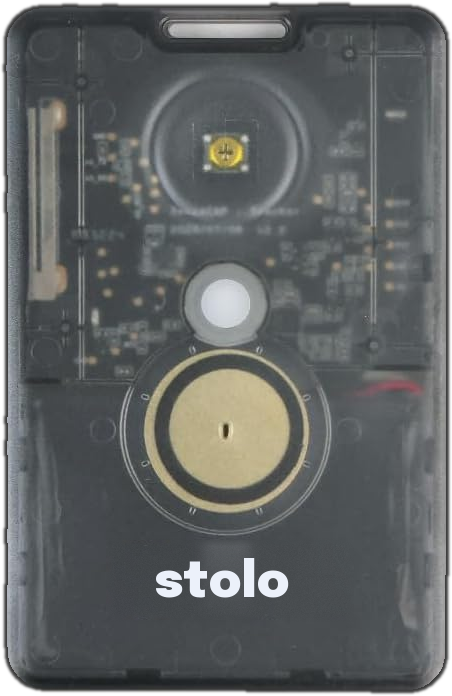
Stolo Node radio firmware
SenseCAP T1000-E · v0.3.1 · October 1, 2026
Turns a Seeed SenseCAP T1000-E tracker card into a pocket LoRa radio for the mesh. It pairs with your phone over Bluetooth with no code to type, and works over Bluetooth or USB with the Stolo app or any RNode-compatible Reticulum software. Pairing, naming and battery in the Stolo app arrive with its next update.
Install: with Python 3 and a USB cable, run pip install adafruit-nrfutil pyserial, then python3 stolo_t1000e_setup.py --flash stolo-t1000e-firmware-0.3.1.zip. The tool flashes the tracker, gives the radio its identity, records the firmware checksum and switches Bluetooth on. If a phone is already connected to the radio, switch that phone’s Bluetooth off while the tool runs.
Pair: a radio with no phone paired accepts a new phone for 2 minutes after it switches on; press the button twice to accept another.
Button: hold 1 s to switch on, hold 4 s to switch off, press once for status and battery, three times to mute, and hold while switching on (about 10 s) to forget all phones.
Radio law: the firmware allows 863–928 MHz and up to 22 dBm. You are responsible for a frequency, power and duty cycle that are legal where you are; the Stolo app offers regional presets. This is firmware only and certifies no hardware.
Source (GPL-3.0): RNode firmware by Mark Qvist, the T1000-E port by idan2025, Semtech’s LR11xx driver (Clear BSD), and Stolo’s changes. Licences and notices for this build: NOTICES.txt. Complete source: firmware (7.7 MB) and board support and libraries (3.5 MB).
eb9021e0495e482adfcf48442fff19c0be867119e75774c5f164ca427ed021eb  stolo-t1000e-firmware-0.3.1.zip
4104e695de298df9ce45a2c2dcb403f08f651471cd4970b865a910fdb93fe744  stolo_t1000e_setup.py
28af635c33a3043b6063de36b7b8895788b63d0cf13857e7b56398f4a8139a46  stolo-node-firmware-0.3.1-source.tar.gz
28effbfae96a8170febf5137bdf73396742520139b808de0bf382798ac5f501e  stolo-t1000e-0.3.1-thirdparty-source.tar.gz
fdf26bf1c974d6a7d37bdc983a65ef4910849bcc233facc6d2c42f76f213deb4  NOTICES.txt
Check what you downloaded
SHA-256 for every file, also published at dl.stolo.io/SHA256SUMS. Compare with shasum -a 256 <file> on macOS and Linux, or certutil -hashfile <file> SHA256 on Windows.
8e518a2931511013f474f2ce4c226abc5d444b5a20cfb28ab33cfb02cb8f9332  Stolo-Android-arm64-v8a.apk
79eb583f0626635dc28c01cf329eb0036c8aef67df07eacb6f2ceaca8d24942f  Stolo-Android-armeabi-v7a.apk
77559db0604b2a50581876202d6daabacbff8ab62fb8268f7f96de42f99cb22a  Stolo-Linux-x64.tar.gz
45803045950fec774a27064a2a1148679533807a84bad39921987c2fc2a8c446  Stolo-Linux-x86_64.AppImage
6e41b336482bf7121e1127c575cdd8cbe412f6b694c67eeb1b936207d4e7d81e  Stolo-macOS-arm64.dmg
7c5c96d9c6287e17e5ef89fa3edaa581aa002392333fffffe19f9bac3f6df1e4  Stolo-Setup-x64.exe
9b000a229d13c497191c8754a48515d33480af87975034e624358aff3ab7e265  Stolo-Windows-x64-portable.zip
Need a hand?
Pairing a radio, a stuck install or a message that won’t deliver: the guides cover the common ones.
New builds, honest caveats
The Android, Windows and Linux builds are new. Every desktop build talks to RNode radios over USB; the files are large because the whole world basemap and the mesh stack ship inside the app, so Stolo works with no connectivity at all.
Something misbehave? Email contact@stolo.io with your platform and what you saw. That is usually enough for us to spot it.